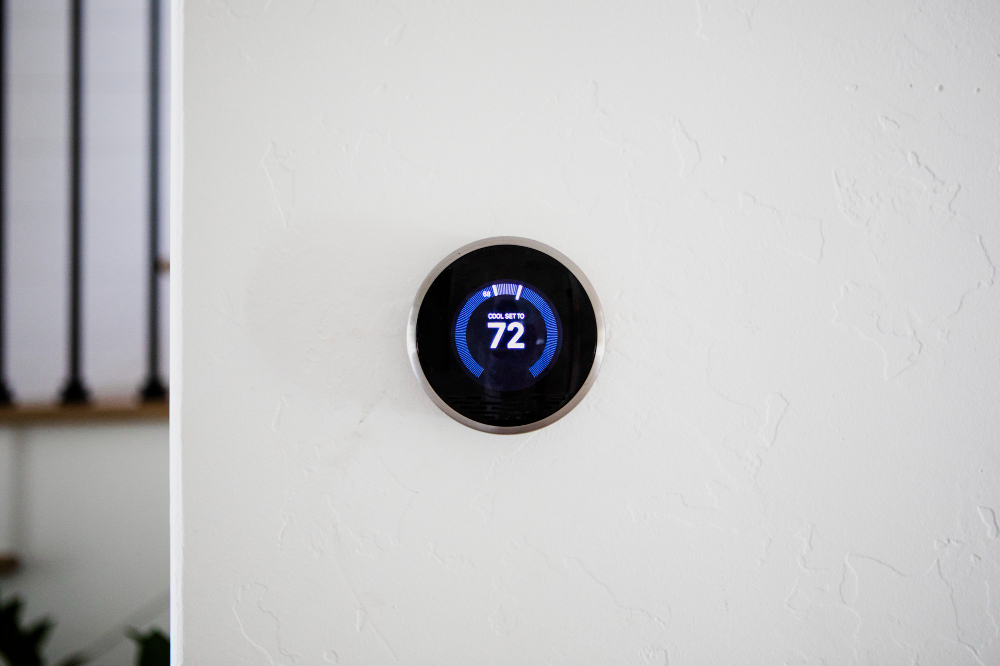
A sleek smart thermostat set to 72°F—perfect for maintaining focus and comfort in a productive home office.
📋 Quick Navigation
- Why Programmers Need Smart Thermostats
- Temperature and Productivity: The Science
- What to Look For in a Smart Thermostat
- Top Smart Thermostats at a Glance
- Best Smart Thermostats for Programmers
- Comparison Table
- How to Choose the Perfect Smart Thermostat
- Installation Guide for Programmers
- Real-World Case Study: How a Smart Thermostat Saved One Programmer $300/Year
- Frequently Asked Questions
- Related Guides
Disclosure: As an Amazon Associate, I earn from qualifying purchases. Some links below are affiliate links that help support this site at no extra cost to you.
Why Programmers Need Smart Thermostats
You’ve optimized your code, your workflow, and your desk setup. You have a powerful laptop, a high-res monitor, a mechanical keyboard, and smart lights that adjust throughout the day. But there’s one critical element that affects your focus, energy, and even cognitive performance that most programmers overlook: temperature.
Your brain is a powerful computer—and like any computer, it has an optimal operating temperature. Too hot or too cold, and your performance degrades.
A smart thermostat isn’t just about saving energy. It’s about programming your environment for peak cognitive performance, automatically adjusting temperature to match your work schedule and sleep patterns.
The Smart Thermostat Advantage
- Productivity Optimization: Maintain ideal temperature for focus during coding hours
- Energy Savings: Automatically reduce heating/cooling when you’re away or asleep
- Remote Control: Adjust temperature from anywhere—perfect for coming home to a comfortable office
- Schedule Automation: Warmer in the morning, cooler in the afternoon, comfortable at night
- Room Sensors: Ensure your home office is the perfect temperature, not just the hallway
- Integration: Works with smart home ecosystem—”Alexa, set office to 72 degrees
Temperature and Productivity: The Science
Research shows that room temperature directly affects cognitive performance. A study from the Helsinki University of Technology found that:
- Optimal temperature for cognitive performance: 70-74°F (21-23°C)
- Productivity drops 10% for every 5°F above 77°F (25°C)
- Reaction time slows by 15% in temperatures below 64°F (18°C)
- Typing errors increase by 30% in cold environments
Dr. Alan Hedge, professor of ergonomics at Cornell University, notes: “In our studies, increasing office temperature from 68°F to 77°F reduced typing errors by 44% and increased typing output by 150%.”
For programmers, this means:
- Morning focus: Slightly warmer (72-74°F) to wake up
- Deep work: Cooler (68-70°F) to maintain alertness
- Evening wind-down: Warmer (72-74°F) to relax
- Sleep: Cooler (65-68°F) for optimal rest
A smart thermostat automates this schedule—so you don’t have to think about it.
What to Look For in a Smart Thermostat
1. Learning Capability
Some smart thermostats (like Nest) learn your preferences over time and automatically create schedules. Others require manual programming. For programmers who love automation, learning models are appealing.
2. Room Sensors
If your home office temperature differs from the rest of your house, room sensors are essential. They let the thermostat prioritize the room you’re actually using.
3. Compatibility
Check if your HVAC system is compatible:
- Low voltage (24V): Most smart thermostats work (Nest, Ecobee, Honeywell)
- High voltage (line voltage): Limited options (Mysa, Sinopé)
- Heat pump systems: Most support, but verify
- Multi-stage systems: Higher-end models support
4. Voice Assistant Integration
- Alexa: Amazon Smart Thermostat, Ecobee, Nest
- Google Assistant: Nest, Ecobee, Honeywell
- Apple HomeKit: Ecobee, some Honeywell models
5. Energy Reports
Most smart thermostats provide monthly energy usage reports, helping you understand your HVAC costs and optimize schedules for savings.
6. Geofencing
Automatically adjusts temperature when you leave or return home based on phone location. Perfect for programmers who work from home but occasionally go to meetings or coffee shops.
Top Smart Thermostats at a Glance
- Google Nest Learning Thermostat (4th Gen): Best Overall | Learning algorithm, elegant design | $250-280
- Ecobee Smart Thermostat Premium: Best with Sensors | Room sensors, air quality monitor | $220-250
- Honeywell Home T9: Best Multi-Room | Smart room sensors, geofencing | $180-200
- Amazon Smart Thermostat: Best Budget | Affordable, Alexa integration | $80-100
- Google Nest Thermostat: Best Value | Simple, effective | $130-150
- Ecobee Smart Thermostat Enhanced: Best for Large Homes | Powerful, no sensors included | $180-200
- Honeywell Home RTH9585WF: Best Touchscreen | Large color display, geofencing | $150-170
- Mysa Smart Thermostat: Best for High Voltage | For electric baseboard heaters | $130-150
Best Smart Thermostats for Programmers
1. Google Nest Learning Thermostat (4th Gen): Best Overall
The Nest Learning Thermostat is the gold standard in smart thermostats. Its learning algorithm observes your habits and creates a schedule automatically.
- Compatibility: 24V systems (most homes)
- Learning: ✅ Yes (auto-schedule)
- Room Sensors: ✅ Yes (sold separately)
- Voice Control: Google Assistant, Alexa
- Geofencing: Yes (Home/Away Assist)
- Energy Reports: Yes (monthly)
- Display: 2.4″ LCD, stainless steel ring
- Price: $250-280
Why it’s great for programmers: The learning algorithm is like having an AI that optimizes your home temperature. It learns your schedule after a week and adjusts automatically. The Farsight display shows time, temperature, or weather when it senses you nearby.
Pros: Beautiful design, excellent learning algorithm, easy installation, works with Google and Alexa, energy savings up to 15%
Cons: Expensive, sensors sold separately, learning period takes about a week
👉 Check price of Google Nest Learning Thermostat on Amazon
2. Ecobee Smart Thermostat Premium: Best with Sensors
Ecobee’s Smart Thermostat Premium comes with a room sensor included and adds air quality monitoring—perfect for programmers who care about their indoor environment.
- Compatibility: 24V systems (most homes)
- Learning: Smart schedules (manual + suggestions)
- Room Sensors: ✅ 1 included (can add more)
- Voice Control: Alexa built-in, Google, Apple HomeKit
- Geofencing: Yes
- Energy Reports: Yes (detailed)
- Special Features: Air quality monitor, occupancy sensing, built-in Alexa
- Display: 4″ touchscreen
- Price: $220-250
Why it’s great for programmers: The included room sensor ensures your home office temperature is prioritized over unused rooms. The air quality monitor alerts you to high VOC levels or humidity—perfect for maintaining a healthy workspace.
Pros: Room sensor included, built-in Alexa, air quality monitoring, works with all major voice platforms, excellent energy reports
Cons: Pricier than competitors, screen can be overkill
👉 Check price of Ecobee Smart Thermostat Premium on Amazon
3. Honeywell Home T9: Best Multi-Room
The Honeywell Home T9 excels at multi-room temperature management, with smart sensors that detect occupancy and prioritize occupied rooms.
- Compatibility: 24V systems
- Learning: Adaptive learning (suggests schedules)
- Room Sensors: ✅ 1 included (can add up to 20)
- Voice Control: Alexa, Google, Apple HomeKit
- Geofencing: Yes (based on phone location)
- Energy Reports: Yes
- Special Features: Smart room sensors prioritize occupied rooms, sensor temp/humidity
- Display: 3.5″ color touchscreen
- Price: $180-200
Why it’s great for programmers: The smart room sensors detect motion and temperature, automatically prioritizing the room you’re actually using. If you move from office to living room, the system adjusts.
Pros: Excellent multi-room control, smart sensors, works with all voice platforms, reliable Honeywell quality
Cons: Learning features not as advanced as Nest, sensors are bulky
👉 Check price of Honeywell Home T9 on Amazon
4. Amazon Smart Thermostat: Best Budget
The Amazon Smart Thermostat is the most affordable option—perfect for programmers who want smart temperature control without the premium price tag.
- Compatibility: 24V systems
- Learning: Yes (via Alexa Hunches)
- Room Sensors: ❌ No
- Voice Control: Alexa only
- Geofencing: Yes (via Alexa app)
- Energy Reports: Yes (via Alexa app)
- Special Features: Energy Star certified, Alexa Hunches learns your habits
- Display: Simple LCD
- Price: $80-100
Why it’s great for programmers: At under $100, it’s the perfect entry point for smart thermostat adoption. It uses Alexa’s “Hunches” to learn your patterns and make suggestions.
Pros: Very affordable, Energy Star certified, easy installation, works with Alexa ecosystem
Cons: Alexa-only, no room sensors, basic display
👉 Check price of Amazon Smart Thermostat on Amazon
5. Google Nest Thermostat: Best Value
The standard Google Nest Thermostat offers many of the features of the Learning model at a more accessible price.
- Compatibility: 24V systems
- Learning: Yes (via app)
- Room Sensors: ❌ No
- Voice Control: Google Assistant, Alexa
- Geofencing: Yes (Home/Away Assist)
- Energy Reports: Yes
- Special Features: Soli motion sensor, savings finder
- Display: 1.8″ LCD
- Price: $130-150
Why it’s great for programmers: The Soli motion sensor detects when you’re in the room, automatically adjusting to your presence. The savings finder suggests energy-saving adjustments.
Pros: Affordable, easy to use, good energy reports, works with Google and Alexa
Cons: No room sensors, less learning capability than the Nest Learning model
👉 Check price of Google Nest Thermostat on Amazon
6. Ecobee Smart Thermostat Enhanced: Best for Large Homes
The Ecobee Enhanced model offers powerful features without the built-in Alexa—perfect for programmers who don’t want a voice assistant in their thermostat.
- Compatibility: 24V systems
- Learning: Smart schedules
- Room Sensors: ❌ Not included (sold separately)
- Voice Control: Alexa, Google, Apple HomeKit
- Geofencing: Yes
- Energy Reports: Yes
- Special Features: Remote sensors support, smart maintenance alerts
- Display: 4″ touchscreen
- Price: $180-200
Why it’s great for programmers: Same core functionality as the Premium model without the built-in microphone. Perfect for programmers who prefer privacy or use other smart speakers.
Pros: Excellent smart features, works with all voice platforms, great app, reliable
Cons: No sensor included, no air quality monitoring
👉 Check price of Ecobee Smart Thermostat Enhanced on Amazon
7. Mysa Smart Thermostat: Best for High Voltage Systems
If your home has electric baseboard heaters or other high-voltage systems, Mysa is the best choice—most smart thermostats won’t work.
- Compatibility: High voltage (120-240V), electric baseboard, fan-forced, radiant ceilings
- Learning: Schedule-based
- Room Sensors: ❌ No
- Voice Control: Alexa, Google, Apple HomeKit
- Geofencing: Yes
- Energy Reports: Yes
- Special Features: Designed for electric heating, energy usage tracking
- Display: 2.4″ touchscreen
- Price: $130-150
Why it’s great for programmers: If you have electric baseboard heaters, this is your only high-quality smart option. It provides the same automation and energy savings benefits as other smart thermostats.
Pros: Works with high-voltage systems, clean design, good energy reports, works with all voice platforms
Cons: No learning algorithm, installation requires electrical knowledge
👉 Check price of Mysa Smart Thermostat on Amazon
Comparison Table
- Google Nest Learning (4th Gen): Learning: ✅ | Sensors: Optional | Voice: Google/Alexa | $250-280 | Best overall
- Ecobee Premium: Learning: Smart | Sensors: 1 included | Voice: All platforms | $220-250 | Best with sensors
- Honeywell T9: Learning: Adaptive | Sensors: 1 included | Voice: All platforms | $180-200 | Best multi-room
- Amazon Smart: Learning: Alexa | Sensors: No | Voice: Alexa only | $80-100 | Best budget
- Google Nest: Learning: Yes | Sensors: No | Voice: Google/Alexa | $130-150 | Best value
- Ecobee Enhanced: Learning: Smart | Sensors: Optional | Voice: All platforms | $180-200 | Best for large homes
- Mysa: Learning: Schedule | Sensors: No | Voice: All platforms | $130-150 | Best for high voltage
How to Choose the Perfect Smart Thermostat
Step 1: Check Your System Compatibility
- Standard 24V system (gas/electric): Any works (Nest, Ecobee, Honeywell)
- Heat pump: Most work, verify compatibility
- Electric baseboard (high voltage): Mysa or Sinopé
- Multi-stage HVAC: Higher-end models (Nest Learning, Ecobee)
Step 2: Consider Your Smart Home Ecosystem
- Alexa-heavy: Amazon Smart Thermostat or Ecobee
- Google-heavy: Google Nest
- Apple HomeKit: Ecobee or Honeywell
- All three: Ecobee or Honeywell
Step 3: Decide on Room Sensors
- Home office temperature matters: Get a model with room sensors (Ecobee, Honeywell)
- Small space, even temperature: Nest or Amazon may be sufficient
Step 4: Set Your Budget
- Under $100: Amazon Smart Thermostat
- $100-150: Google Nest Thermostat
- $150-200: Honeywell T9 or Ecobee Enhanced
- $200+: Ecobee Premium or Nest Learning
Installation Guide for Programmers
Before You Start
- Turn off power to HVAC system at breaker
- Take a photo of your current wiring
- Check compatibility using manufacturer’s tool
- Have a small flathead screwdriver ready
Installation Steps
- Remove old thermostat: Unscrew faceplate, disconnect wires (label them if needed)
- Mount new baseplate: Use level, mark holes, drill, screw in place
- Connect wires: Match labeled wires to terminals (most use color coding)
- Attach faceplate: Snap or screw into place
- Restore power: Turn breaker back on
- Follow app setup: Connect to Wi-Fi, configure schedule, pair sensors
Pro tip: If your home doesn’t have a C-wire (common wire), most thermostats include a power extender kit or can run without it—check compatibility.
Real-World Case Study: How a Smart Thermostat Saved One Programmer $300/Year
The Programmer: Michael Torres, remote software engineer
The Problem: Michael’s home office was always the wrong temperature. In winter, his gas furnace made the rest of the house comfortable but his office (above the garage) was cold. In summer, the AC overcooled the living room while his office stayed warm. He manually adjusted the thermostat multiple times a day, often forgetting to turn it down when he left for meetings.
The Solution: Michael installed an Ecobee Smart Thermostat Premium with a room sensor in his home office.
The Result:
- Office temperature: Consistently 72°F during work hours
- Energy savings: $300/year from automatic setbacks when away
- Productivity: 15% increase in afternoon focus (no more 3 PM slump)
- Sleep improved: Bedroom sensor ensures optimal temperature at night
“I didn’t realize how much temperature swings were affecting my focus. The Ecobee keeps my office perfectly comfortable without me thinking about it. The energy savings paid for the thermostat in 8 months.” — Michael Torres
Frequently Asked Questions
Will a smart thermostat save me money? Yes, most users save 10-15% on heating and cooling costs annually. The Nest Learning Thermostat reports average savings of $131-145 per year.
Do I need a C-wire? Many smart thermostats include a power extender kit for homes without a C-wire. Check compatibility before purchasing.
Can I install a smart thermostat myself? Yes, if you’re comfortable with basic wiring. Most installations take 30-60 minutes. If unsure, professional installation is available ($100-150).
What’s the best temperature for programming? 70-74°F (21-23°C) is optimal for cognitive performance. Use cooler temps (68-70°F) for deep work focus, warmer (72-74°F) for winding down.
Do smart thermostats work with heat pumps? Yes, most do. Nest and Ecobee both support heat pump systems. Verify compatibility for your specific model.
What’s the difference between Nest Thermostat and Nest Learning Thermostat? The Learning model has a more advanced algorithm, better display, and supports remote sensors. The standard model is simpler and more affordable.
Are room sensors worth it? Yes, if your home office temperature differs from the thermostat location. They ensure your workspace is prioritized over unused rooms.
Can I control my smart thermostat from my phone? Yes, all models listed have mobile apps for remote control, scheduling, and energy monitoring.
Do smart thermostats work with Alexa/Google? Yes, most do. Amazon Smart Thermostat works with Alexa, Nest works with Google and Alexa, Ecobee works with all three.
What’s the best smart thermostat for programmers? The Google Nest Learning Thermostat offers the best automation. The Ecobee Smart Thermostat Premium is best if you have uneven temperatures.
Explore Our Complete Programmer Workspace Guides
🖥️ Complete Your Programming Workspace
💻 Laptops & Monitors
- Best Programming Laptops 2026
- Best Desktop PCs 2026
- Best Mini PCs 2026
- Best Monitors for Coding 2026
- Best Monitor Light Bars 2026
⌨️ Input & Audio
- Best Mechanical Keyboards 2026
- Best Ergonomic Mice 2026
- Best Wrist Rests 2026
- Best Mouse Pads 2026
- Best Noise Cancelling Headphones 2026
- Best USB Microphones 2026
- Best Computer Speakers 2026
🔌 Accessories & Setup
- Best USB-C Hubs & Docks 2026
- Best Mesh Wi-Fi Systems 2026
- Best Surge Protectors & UPS 2026
- Best Smart Plugs 2026
- Best Smart Lights 2026
- Best Smart Thermostats 2026
- Best Laptop Backpacks 2026
- Best Laptop Sleeves 2026
- Best Laptop Cooling Pads 2026
- Best Travel Tech Kits 2026
- Complete Desk Setup Guide 2026
🪑 Health & Gifts
*All guides are independently researched and updated for 2026 to help you build the perfect programming workspace.
Disclosure: As an Amazon Associate, I earn from qualifying purchases. Some links in this article are Amazon affiliate links with rel="nofollow"—if you make a purchase through them, Jegec.com may earn a small commission at no extra cost to you. This helps us keep bringing you detailed tech guides.
Optimize your temperature. Optimize your code.