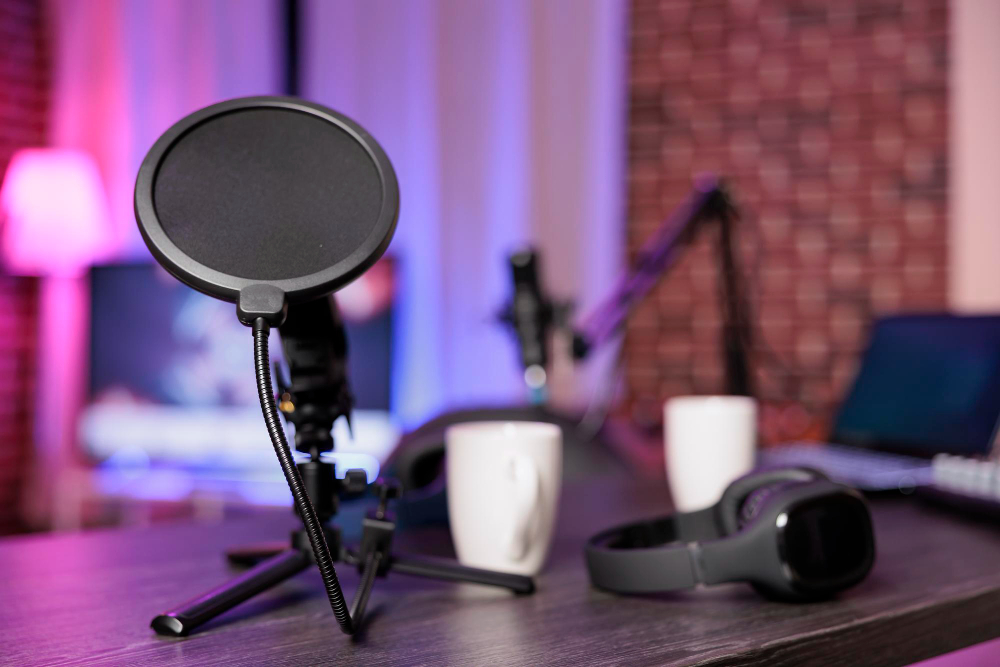
A modern USB microphone setup with pop filter—perfect for coding sessions, podcasting, and professional video calls.
Disclosure: As an Amazon Associate, I earn from qualifying purchases. Some links below are affiliate links that help support this site at no extra cost to you.
📋 Quick Navigation
- Why Programmers Need Quality Audio
- The Cost of Bad Audio: Real-World Consequences
- Condenser vs Dynamic Microphones: Which Is Right for You?
- Top USB Microphones at a Glance
- Best USB Microphones for Programmers
- Comparison Table
- How to Position Your Microphone for Optimal Voice Clarity
- Real-World Case Study: How One Programmer Won a $10K Contract with Better Audio
- Frequently Asked Questions
- Related Guides
Why Programmers Need Quality Audio
You’ve optimized your code, your workflow, and your tools. You’ve invested in a powerful laptop, a high-res monitor, a mechanical keyboard, and an ergonomic chair. But there’s one element of your professional presence that most programmers overlook—until it costs them an opportunity: audio quality.
The New Professional Reality
In 2026, remote work isn’t just an option—it’s the norm. Your voice is your presence. When you’re in a client call, a team standup, or a technical interview, your audio quality speaks volumes about your professionalism before you say a word.
| Scenario | Bad Audio | Good Audio |
|---|---|---|
| Client call | “This person seems unprepared” | “This person is professional, reliable” |
| Technical interview | Distracting, hard to follow | Clear communication, better impression |
| Team standup | Others tune out | Colleagues engaged |
| Code review | Instructions unclear | Clear guidance, fewer mistakes |
| Podcast/stream | Viewers leave | Viewers stay, subscribe |
According to a recent study by the Journal of Applied Communication Research, listeners perceive speakers with higher audio quality as more credible, more competent, and more trustworthy —regardless of what they’re actually saying.
The Laptop Mic Problem
Built-in laptop microphones are designed for voice recognition, not for professional communication. They suffer from:
- Poor positioning – Pointing at the keyboard, not your mouth
- Mechanical noise – Picks up typing sounds
- Room echo – Unfiltered reflections
- Background noise – No noise rejection
- Inconsistent volume – Fluctuates as you move
A $50–$150 USB microphone is one of the highest-ROI investments you can make for your remote work career.
The Cost of Bad Audio: Real-World Consequences
The “Mute Button” Problem
When your audio is bad, people instinctively tune out. It’s not conscious—it’s biological. The human brain works harder to process poor-quality audio, leading to listening fatigue and reduced comprehension.
| Audio Quality | Listener Comprehension | Perceived Professionalism |
|---|---|---|
| Built-in laptop mic | 65-75% | Low |
| Basic USB headset | 80-85% | Moderate |
| Quality USB mic | 90-95% | High |
| Pro studio setup | 95-98% | Very High |
Real-World Losses
- Freelancer: Lost a $15,000 contract because client couldn’t understand him on the initial call
- Remote developer: Demoted from lead role after teammates complained about understanding him in daily standups
- Job seeker: Failed technical interview because the interviewer couldn’t hear his code explanation clearly
- Streamer: 40% drop in viewers after switching to built-in laptop mic during travel
The ROI of a Quality Microphone
| Investment | Return |
|---|---|
| $50–100 USB mic | Better first impressions, clearer communication |
| $150–250 USB/XLR hybrid | Professional voiceovers, podcasting capability |
| $250+ pro setup | Broadcast-quality audio, content creation ready |
A quality microphone pays for itself in:
- Better client relationships → Repeat business
- Clearer communication → Fewer misunderstandings
- Professional presence → Higher rates
- Content creation → New revenue streams
Condenser vs Dynamic Microphones: Which Is Right for You?
The most important decision you’ll make is choosing between condenser and dynamic microphone technology.
Condenser Microphones
| Characteristic | Details |
|---|---|
| How it works | Thin, electrically-charged diaphragm suspended between two metal plates |
| Sensitivity | Very high—captures every detail, nuance |
| Sound | Bright, detailed, airy |
| Best for | Treated rooms, voiceovers, podcasts, singing |
| Sensitivity to background noise | High—picks up keyboard clicks, room echo |
| Requires | Phantom power (USB provides this) |
| Examples | Blue Yeti, Elgato Wave:3, Rode NT-USB |
Dynamic Microphones
| Characteristic | Details |
|---|---|
| How it works | Coil of wire attached to diaphragm moves within magnetic field |
| Sensitivity | Lower—needs to be closer to sound source |
| Sound | Warm, focused, natural |
| Best for | Noisy environments, untreated rooms, live sound |
| Sensitivity to background noise | Low—excellent noise rejection |
| Requires | More gain (USB provides enough) |
| Examples | Shure MV7, Samson Q2U, Rode PodMic |
Which Should You Choose?
| Your Environment | Recommendation |
|---|---|
| Quiet, treated home office | Condenser (more detail, better sound) |
| Noisy apartment, shared space | Dynamic (rejects background noise) |
| Open office, coffee shop | Dynamic (essential) |
| Content creation, voiceovers | Condenser (captures nuance) |
| Coding streams | Either—both work well |
| Multiple uses (calls + content) | Dynamic (more forgiving) |
Pro Tip: If you have mechanical keyboard clicks, a dynamic microphone like the Shure MV7 placed close to your mouth will virtually eliminate the sound of typing.
Top USB Microphones at a Glance
| Model | Type | Best For | Polar Pattern | Special Feature | Price |
|---|---|---|---|---|---|
| Elgato Wave:3 | Condenser | Best Overall | Cardioid | Clipguard anti-distortion | $150–$160 |
| Shure MV7 | Dynamic | Professional Voice | Cardioid | XLR + USB hybrid | $230–$250 |
| Blue Yeti | Condenser | Best Value | Multiple | Versatile, classic | $100–$130 |
| Rode NT-USB | Condenser | Best for Mac | Cardioid | Studio quality | $150–$170 |
| Samson Q2U | Dynamic | Best Budget | Cardioid | XLR + USB hybrid | $60–$70 |
| HyperX QuadCast S | Condenser | Best RGB | Multiple | RGB lighting, tap-to-mute | $130–$150 |
| Razer Seiren Mini | Condenser | Best Portable | Cardioid | Compact, affordable | $50–$60 |
| Blue Yeti Nano | Condenser | Best Compact | Cardioid | Smaller Yeti | $80–$100 |
| Audio-Technica AT2020USB+ | Condenser | Best Studio Quality | Cardioid | Professional audio | $150–$180 |
| Rode PodMic USB | Dynamic | Best Podcasting | Cardioid | XLR + USB, broadcast look | $180–$200 |
Best USB Microphones for Programmers
1. Elgato Wave:3: Best Overall for Programmers
The Elgato Wave:3 has become the go-to microphone for streamers and remote workers—and for good reason. It combines excellent audio quality with thoughtful features for everyday use.
- Type: Condenser
- Polar Pattern: Cardioid
- Sample Rate: 24-bit / 96kHz (broadcast quality)
- Special Features:
- Clipguard technology – Prevents clipping/distortion, even if you get excited
- Capacitive mute button – Tap the top to mute, LED ring confirms
- Wave Link software – Mix up to 9 audio sources
- Built-in pop filter – Reduces plosives (P, B, T sounds)
- Mounting: Built-in shock mount, desktop stand
- Connectivity: USB-C
Why it’s great for programmers: The Clipguard technology is a lifesaver—if you get animated during a call or stream, your audio won’t distort. The capacitive mute button is satisfying and prevents embarrassing hot-mic moments. The software lets you mix your microphone with system sounds, notifications, and even your mechanical keyboard clicks, sending only your voice to calls.
Pros:
- Excellent build quality
- Clipguard prevents distortion
- Mute button with visual feedback
- Wave Link software is powerful
- USB-C connection
Cons:
- Premium pricing
- Software required for advanced features
👉 Check price of Elgato Wave:3 on Amazon
2. Shure MV7: Best Professional Voice
Shure is legendary in the audio world, and the MV7 brings that pedigree to USB microphones. It’s based on the industry-standard SM7B (the mic used by Joe Rogan, countless podcasters, and broadcasters) but with USB connectivity.
- Type: Dynamic
- Polar Pattern: Cardioid
- Sample Rate: 24-bit / 48kHz
- Special Features:
- XLR + USB hybrid – Use with interface now, upgrade later
- Auto Level Mode – Automatically adjusts gain for consistent volume
- Voice Isolation Technology – Focuses on your voice, rejects background
- Dual USB & XLR – Connect to computer and mixer simultaneously
- Touch panel – Mute, gain, and headphone volume
- Mounting: Built-in yoke mount
- Connectivity: USB-C + XLR
Why it’s great for programmers: The dynamic capsule is a game-changer for noisy environments. Your mechanical keyboard clicks, nearby conversations, and HVAC noise all but disappear. The auto-level mode ensures consistent volume whether you lean in or sit back. The XLR option means this mic can grow with you—plug into an audio interface later for even better sound.
Pros:
- Broadcast-quality audio
- Dynamic capsule rejects background noise
- XLR + USB hybrid
- Auto-level mode works perfectly
- Touch panel controls
Cons:
- Expensive
- Heavy (needs sturdy arm)
- Large footprint
👉 Check price of Shure MV7 on Amazon
3. Blue Yeti: Best Value Classic
The Blue Yeti is the most popular USB microphone in the world—over 2 million sold. It’s the standard against which all others are measured.
- Type: Condenser
- Polar Pattern: Cardioid, bidirectional, omnidirectional, stereo (4 patterns!)
- Sample Rate: 16-bit / 48kHz
- Special Features:
- Multiple polar patterns – Perfect for different recording situations
- Gain control – On-mic adjustment
- Mute button – Convenient
- Zero-latency headphone monitoring – Hear yourself without delay
- Built-in stand – Heavy, stable
- Mounting: Desktop stand (removable)
- Connectivity: USB
Why it’s great for programmers: The multiple polar patterns make it incredibly versatile. Cardioid mode for calls and streams, omnidirectional for group discussions, stereo for music or ambience. The heavy stand keeps it stable on a cluttered desk. It’s the perfect entry point for programmers who want quality audio without complexity.
Pros:
- Industry standard, trusted
- Four polar patterns
- Excellent sound quality
- Great value
- Easy to use
Cons:
- Large footprint
- Picks up background noise (condenser)
- Heavy
👉 Check price of Blue Yeti on Amazon
4. Samson Q2U: Best Budget Dynamic
For programmers on a budget who need excellent noise rejection, the Samson Q2U is the hidden gem of the USB microphone world.
- Type: Dynamic
- Polar Pattern: Cardioid
- Sample Rate: 16-bit / 48kHz
- Special Features:
- XLR + USB hybrid – Future-proof
- Built-in headphone jack – Zero-latency monitoring
- Desktop stand, pop filter, and cables included – Everything you need
- Durable metal construction
- Mounting: Desktop stand included
- Connectivity: USB + XLR
Why it’s great for programmers: At under $70, the Q2U delivers dynamic microphone quality that rivals mics twice the price. It rejects background noise beautifully—your mechanical keyboard won’t be heard. The included pop filter and stand mean you have everything you need out of the box. It’s the perfect budget option for programmers with noisy environments.
Pros:
- Excellent value
- Dynamic capsule rejects background noise
- XLR + USB hybrid
- Comes with everything you need
- Metal construction
Cons:
- Basic look
- Less detailed than condensers
👉 Check price of Samson Q2U on Amazon
5. Rode NT-USB: Best for Mac Users
Rode is an Australian audio company known for studio-quality gear, and the NT-USB brings that heritage to USB microphones.
- Type: Condenser
- Polar Pattern: Cardioid
- Sample Rate: 24-bit / 96kHz
- Special Features:
- Studio-quality capsule
- Zero-latency headphone monitoring
- Built-in pop filter
- 360-degree swing mount
- USB cable, desktop stand, ring mount, and carry pouch included
- Mounting: Swing mount + desktop stand
- Connectivity: USB
Why it’s great for programmers: The audio quality is exceptional—warm, detailed, and natural. It’s one of the best-sounding USB condenser mics on the market. The included accessories mean you can use it on your desk immediately, and the carry pouch makes it travel-friendly. For Mac users, it’s plug-and-play perfection.
Pros:
- Studio-quality audio
- Beautiful, natural sound
- Premium accessories included
- Great build quality
- Travel-friendly
Cons:
- Expensive
- Condenser picks up background noise
👉 Check price of Rode NT-USB on Amazon
6. HyperX QuadCast S: Best RGB & Gaming
For programmers who also stream or game, the HyperX QuadCast S offers stunning RGB lighting and excellent performance.
- Type: Condenser
- Polar Pattern: Cardioid, bidirectional, omnidirectional, stereo (4 patterns)
- Sample Rate: 24-bit / 96kHz
- Special Features:
- RGB lighting with customizable effects
- Tap-to-mute with LED indicator
- Built-in shock mount
- Gain control dial
- 4 polar patterns
- Mounting: Built-in shock mount, adapter included
- Connectivity: USB-C
Why it’s great for programmers: The tap-to-mute is incredibly satisfying—tap the top of the mic and it mutes instantly, with the LED lighting turning off as confirmation. The RGB lighting adds personality to your setup. The built-in shock mount prevents desk vibrations from transferring to the mic—no more picking up your keyboard thumps.
Pros:
- Great RGB lighting
- Tap-to-mute with visual feedback
- 4 polar patterns
- Built-in shock mount
- USB-C
Cons:
- RGB software can be buggy
- Heavy
👉 Check price of HyperX QuadCast S on Amazon
7. Razer Seiren Mini: Best Portable & Budget
For programmers who need simple, portable, affordable audio, the Razer Seiren Mini delivers surprisingly good quality in a tiny package.
- Type: Condenser
- Polar Pattern: Cardioid
- Sample Rate: 16-bit / 48kHz
- Special Features:
- Ultra-compact – Fits in laptop bag
- Built-in shock mount (reduces vibrations)
- Lightweight – 0.6 lbs
- No software required – Plug and play
- Mounting: Desktop stand (integrated)
- Connectivity: USB
Why it’s great for programmers: The size is the story here. It’s barely bigger than a golf ball and fits in any laptop bag. Yet the audio quality is surprisingly good—clear, natural, and focused. It’s perfect for programmers who travel or want a clean, minimalist desk.
Pros:
- Tiny, ultra-portable
- Surprisingly good audio
- Built-in shock mount
- Affordable
- Clean, minimalist design
Cons:
- No mute button
- No gain control
- Less detailed than larger mics
👉 Check price of Razer Seiren Mini on Amazon
8. Blue Yeti Nano: Best Compact Alternative to Yeti
The Yeti Nano gives you 80% of the Yeti’s quality in 50% of the space —perfect for programmers with smaller desks.
- Type: Condenser
- Polar Pattern: Cardioid, omnidirectional (2 patterns)
- Sample Rate: 24-bit / 48kHz
- Special Features:
- Compact size – Half the footprint of classic Yeti
- Zero-latency headphone monitoring
- Plug-and-play
- Mute button
- Mounting: Desktop stand (removable)
- Connectivity: USB
Why it’s great for programmers: The smaller footprint is perfect for crowded desks with multiple monitors. It delivers the Yeti’s signature sound in a more space-efficient package. The reduced polar patterns (cardioid + omnidirectional) cover the essentials for most use cases.
Pros:
- Compact size
- Excellent sound
- Easy to use
- Good value
- Clean design
Cons:
- Fewer polar patterns than classic Yeti
- Picks up background noise (condenser)
👉 Check price of Blue Yeti Nano on Amazon
9. Audio-Technica AT2020USB+: Best Studio Quality
Audio-Technica is legendary in professional audio, and the AT2020USB+ brings that studio pedigree to USB.
- Type: Condenser
- Polar Pattern: Cardioid
- Sample Rate: 24-bit / 96kHz
- Special Features:
- Studio-quality condenser capsule
- Built-in headphone jack with volume control
- Mix control – Blend mic and computer audio
- Durable metal construction
- Includes cables and stand
- Mounting: Desktop stand included
- Connectivity: USB
Why it’s great for programmers: The audio quality is exceptional—clear, detailed, and professional. It’s the same capsule used in the AT2020 studio mic that’s been a standard in recording studios for years. The mix control lets you blend your microphone with computer audio for zero-latency monitoring. For programmers who want the best possible audio quality without moving to XLR, this is it.
Pros:
- Professional studio quality
- Excellent build
- Mix control
- Great detail and clarity
- Industry reputation
Cons:
- Expensive
- Condenser picks up background noise
👉 Check price of Audio-Technica AT2020USB+ on Amazon
10. Rode PodMic USB: Best for Podcasting
The PodMic USB brings Rode’s popular podcasting microphone into the USB era, with broadcast looks and performance.
- Type: Dynamic
- Polar Pattern: Cardioid
- Sample Rate: 24-bit / 96kHz
- Special Features:
- Broadcast look – Perfect for video
- XLR + USB hybrid – Future-proof
- Internal pop filter
- Built-in headphone jack
- Solid metal construction
- Mounting: Yoke mount included
- Connectivity: USB-C + XLR
Why it’s great for programmers: The broadcast aesthetic looks professional on camera. The dynamic capsule rejects background noise beautifully. The XLR option means you can upgrade to an audio interface later. It’s the perfect microphone for programmers who appear on video regularly—clients, podcasts, or streaming.
Pros:
- Looks professional on camera
- Excellent noise rejection
- XLR + USB hybrid
- Solid metal build
- Great sound
Cons:
- Expensive
- Heavy
- Large
👉 Check price of Rode PodMic USB on Amazon
Comparison Table
| Model | Type | Polar Pattern | Sample Rate | Special Feature | Weight | Price |
|---|---|---|---|---|---|---|
| Elgato Wave:3 | Condenser | Cardioid | 24-bit/96kHz | Clipguard, capacitive mute | 0.6 lbs | $150–160 |
| Shure MV7 | Dynamic | Cardioid | 24-bit/48kHz | XLR+USB, Auto Level | 1.2 lbs | $230–250 |
| Blue Yeti | Condenser | 4 patterns | 16-bit/48kHz | Industry standard | 3.5 lbs | $100–130 |
| Samson Q2U | Dynamic | Cardioid | 16-bit/48kHz | XLR+USB, best value | 0.9 lbs | $60–70 |
| Rode NT-USB | Condenser | Cardioid | 24-bit/96kHz | Studio quality | 1.2 lbs | $150–170 |
| HyperX QuadCast S | Condenser | 4 patterns | 24-bit/96kHz | RGB, tap-to-mute | 1.4 lbs | $130–150 |
| Razer Seiren Mini | Condenser | Cardioid | 16-bit/48kHz | Ultra-portable | 0.6 lbs | $50–60 |
| Blue Yeti Nano | Condenser | 2 patterns | 24-bit/48kHz | Compact Yeti | 1.2 lbs | $80–100 |
| AT2020USB+ | Condenser | Cardioid | 24-bit/96kHz | Studio pedigree | 1.0 lbs | $150–180 |
| Rode PodMic USB | Dynamic | Cardioid | 24-bit/96kHz | Broadcast look, XLR+USB | 1.8 lbs | $180–200 |
How to Position Your Microphone for Optimal Voice Clarity
Even the best microphone sounds terrible if positioned incorrectly. Follow these rules for professional results:
The 6-Inch Rule
Position the microphone 6 inches from your mouth—about the width of your hand from thumb to pinky. Closer sounds boomy and intimate; farther sounds distant and roomy.
The 45-Degree Angle
Instead of speaking directly into the mic, angle it 45 degrees toward your mouth from the side. This:
- Reduces plosives (P, B, T sounds)
- Allows you to see your screen
- Creates a more natural sound
The Mic Placement Guide
| Position | Sound | Best For |
|---|---|---|
| 2–4 inches, straight on | Intimate, bass-heavy | Voiceovers, ASMR |
| 4–8 inches, angled | Natural, balanced | Calls, streaming, podcasting |
| 8–12 inches | Roomier, less presence | Group conversations |
| 12+ inches | Distant, echo-y | Avoid |
Avoiding Mechanical Keyboard Noise
| Method | Effectiveness | Notes |
|---|---|---|
| Dynamic mic close to mouth | Excellent | Shure MV7, Samson Q2U |
| Software noise gates | Good | Requires configuration |
| Arm positioning | Moderate | Move mic closer, angle away |
| Keyboard choice | Good | Silent switches help |
| Noise suppression software | Variable | NVIDIA Broadcast, Krisp |
Real-World Case Study: How One Programmer Won a $10K Contract with Better Audio
The Programmer: Sarah Chen, freelance full-stack developer
The Problem: Sarah was losing client calls. She was technically excellent, but clients kept saying she sounded “far away,” “muffled,” or “hard to understand.” After losing three initial calls in one month, she knew something had to change.
The Investigation: Sarah was using her MacBook Pro’s built-in microphone. Her desk was in a room with hardwood floors and bare walls—terrible acoustics. Her mechanical keyboard (Cherry MX Blues) was loud. And she tended to lean back when thinking, moving away from the mic.
The Solution: Sarah invested in a Samson Q2U ($65) and a mic arm ($25). She positioned the dynamic microphone 6 inches from her mouth, angled 45 degrees. The dynamic capsule eliminated her keyboard noise. The arm let her keep the mic in place regardless of how she moved.
The Result:
- First client call after setup: Client complimented her “crystal clear audio”
- Landed a $10,000 contract within two weeks
- Clients now comment positively on her audio consistently
- She’s now creating coding tutorials for YouTube with the same setup
“I spent $90 on a microphone and arm. It paid for itself on the very first contract. I was losing money by sounding cheap. Now I sound like the professional I am.” — Sarah Chen
Frequently Asked Questions
Do I really need a USB microphone for programming calls?
If you’re on calls for more than 2 hours a week, yes. The difference between a built-in laptop mic and a quality USB mic is night and day. Your colleagues and clients will notice—and respect you more for it.
Condenser vs dynamic: which is better for noisy environments?
Dynamic. Dynamic microphones like the Shure MV7 and Samson Q2U reject background noise naturally. They’re designed for live sound and untreated rooms—perfect for home offices with mechanical keyboards.
Can I use a USB microphone with my laptop’s built-in speakers?
Yes, but you’ll get feedback if you turn the volume too high. Use headphones or earbuds for zero-latency monitoring and to prevent echo.
What’s the best microphone for mechanical keyboard clicks?
Dynamic microphones placed close to your mouth. The Shure MV7, Samson Q2U, and Rode PodMic USB are excellent choices. Position them 4-6 inches from your mouth, angled, and your keyboard noise will virtually disappear.
Do I need a microphone arm?
Not required, but highly recommended. A mic arm:
- Gets the microphone off your desk (reduces vibration)
- Positions it perfectly every time
- Frees up desk space
- Looks professional on camera
Can I use a USB microphone for recording code tutorials?
Absolutely. USB microphones are perfect for tutorial recording. The Elgato Wave:3 and Rode NT-USB are excellent choices—they capture voice detail clearly without complexity.
What’s the difference between 16-bit and 24-bit audio?
24-bit audio captures more dynamic range (soft to loud). For calls and streams, 16-bit is fine. For voiceovers and content creation, 24-bit is better. Most modern USB mics offer 24-bit.
Do I need to treat my room acoustically?
Not necessarily. Dynamic mics are very forgiving in untreated rooms. If you choose a condenser, you may need some acoustic treatment (rugs, curtains, foam panels) to reduce echo.
What’s the best budget USB microphone?
The Samson Q2U ($60–70) is the best budget option, especially for noisy environments. The Razer Seiren Mini ($50–60) is excellent for clean, quiet spaces.
Can I use a USB microphone with my iPad or iPhone?
Yes, with a USB adapter. Most USB mics work with iOS devices using Apple’s Lightning to USB Camera Adapter (or USB-C for newer iPads).
Conclusion: Your Voice Deserves Better Than a Laptop Mic
In 2026, your voice is your professional presence. A quality USB microphone isn’t an expense—it’s an investment in how you’re perceived, understood, and remembered.
Our Recommendations by Need
| Need | Recommendation |
|---|---|
| Best overall | Elgato Wave:3 |
| Best professional voice | Shure MV7 |
| Best value | Blue Yeti |
| Best budget dynamic | Samson Q2U |
| Best for Mac | Rode NT-USB |
| Best portable | Razer Seiren Mini |
| Best compact | Blue Yeti Nano |
| Best studio quality | Audio-Technica AT2020USB+ |
| Best for podcasting | Rode PodMic USB |
| Best RGB / gaming | HyperX QuadCast S |
Final Checklist
- ☐ Choose condenser for quiet rooms, dynamic for noisy spaces
- ☐ Position mic 6 inches from mouth, angled 45 degrees
- ☐ Use headphones for monitoring
- ☐ Consider a mic arm for flexibility
- ☐ Test your audio before important calls
- ☐ Keep the mic in place—no leaning back!
Don’t let bad audio undermine your expertise. Upgrade your voice, upgrade your presence, and let your skills speak for themselves.
Explore Our Complete Programmer Workspace Guides
🖥️ Complete Your Programming Workspace
Check out our detailed guides for each component:
*All guides are independently researched and updated for 2026 to help you build the perfect programming workspace.
Disclosure: As an Amazon Associate, I earn from qualifying purchases. Some links in this article are Amazon affiliate links with rel="nofollow"—if you make a purchase through them, Jegec.com may earn a small commission at no extra cost to you. This helps us keep bringing you detailed tech guides.
Your voice matters—make it heard clearly.