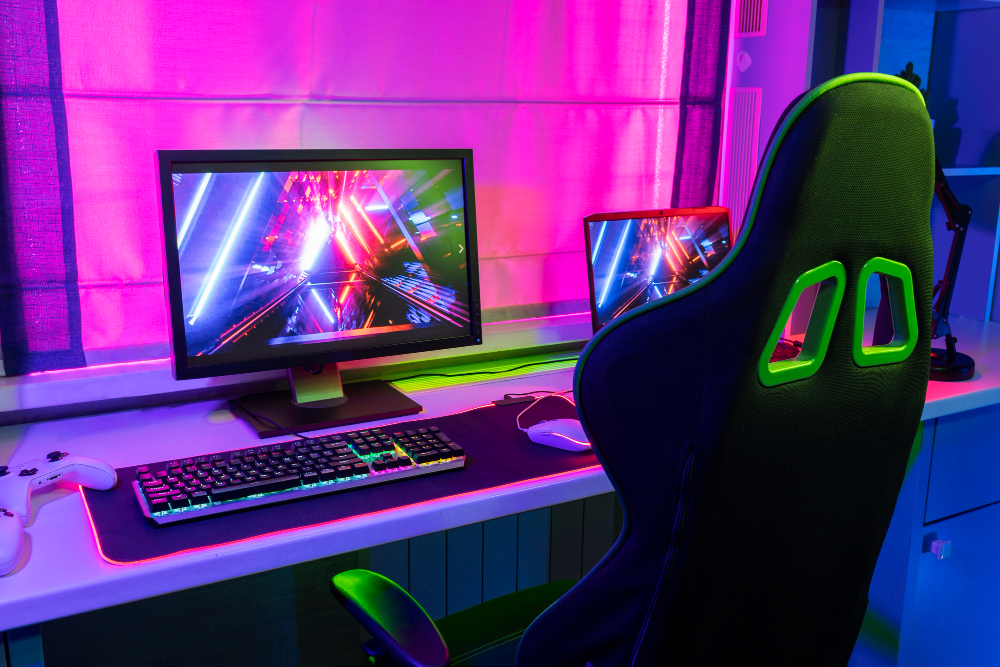
A modern programmer workspace featuring an ergonomic office chair, dual monitors, and RGB lighting for a comfortable coding environment.
You’ve invested in the perfect laptop, a high-resolution monitor, a mechanical keyboard, and a USB hub to connect it all. Your workspace looks incredible. But there’s one piece of the puzzle most programmers overlook—until their back starts hurting.
The reality: Programmers sit for 8 to 12 hours a day, often in the same position for hours at a time . Over months and years, this sedentary lifestyle leads to back pain, neck stiffness, wrist strain, poor circulation, and even long-term spinal issues .
According to the American Chiropractic Association, over 80% of adults experience lower back pain at some point, and sedentary work is a major contributor . For programmers, who spend their entire careers at a desk, a poor chair doesn’t just cause discomfort—it quietly steals your focus, reduces your productivity, and can permanently damage your health .
The good news? The right ergonomic chair is preventive medicine. It supports your body’s natural alignment, reduces pressure points, and lets you focus on what matters: writing great code .
I’ve researched dozens of chairs, analyzed expert reviews from ergonomists and physical therapists, and considered what matters most for long coding sessions. Whether you’re a student on a budget, a remote developer upgrading your home office, or a tech lead with chronic back pain, here are the best ergonomic office chairs for programmers in 2026.
Disclosure: As an Amazon Associate, I earn from qualifying purchases. Some links below are affiliate links that help support this site at no extra cost to you.
Quick Picks: Best Chairs for Programmers
| Model | Best For | Key Feature | Adjustability | Est. Price |
|---|---|---|---|---|
| Herman Miller Aeron | The Gold Standard | Iconic mesh design, 12-year warranty | 8-way adjustable | $1,500-1,800 |
| Steelcase Gesture | Best for Arm Support | 360° armrest articulation | 10-way adjustable | $1,300-1,500 |
| Herman Miller Embody | Best Back Support | Pixelated support system | 9-way adjustable | $1,600-1,900 |
| Sihoo Doro C300 | Best Value | Adaptive dynamic lumbar | 8-way adjustable | $300-350 |
| Sihoo Doro S300 | Best for Intense Coding | Anti-gravity mechanism | 10-way adjustable | $500-600 |
| Autonomous ErgoChair Pro+ | Best Mid-Range | Infinite recline lock | 4D armrests | $550-650 |
| Steelcase Series 2 | Best Budget Premium | Affordable Steelcase quality | 7-way adjustable | $700-800 |
| Branch Ergonomic Chair | Best Sustainable | Tri-point lumbar system | 8-way adjustable | $700-800 |
| Staples Hyken | Best Budget | Breathable mesh, affordable | 5-way adjustable | $250-300 |
| Clatina Mellet | Best Budget Alternative | Mesh back, adjustable lumbar | 6-way adjustable | $250-300 |
Why Ergonomics Matter for Programmers
The Hidden Cost of Sitting
When you’re deep in flow state, debugging a complex issue or architecting a new feature, you don’t notice the subtle signals your body sends. Your shoulders slowly hunch forward. Your lower back loses contact with the chair. Your neck cranes toward the screen .
Over time, these micro-adjustments become chronic problems:
Dr. Lena Torres, Physical Therapist and NIOSH Ergonomics Lead, explains:
“The moment your feet dangle or your pelvis rotates posteriorly, your entire kinetic chain compensates. You don’t ‘get used to’ poor seating—you adapt pathologically. A chair that supports neutral pelvic tilt allows the lumbar spine to maintain its natural lordosis, which in turn reduces disc hydration loss and facet joint loading. That’s not comfort. That’s tissue preservation.”
How the Right Chair Helps
A truly ergonomic chair does three things :
- Supports dynamic movement – You shouldn’t sit still. A good chair moves with you, allowing micro-adjustments throughout the day.
- Maintains spinal alignment – Your spine has a natural S-curve. The chair should support that curve, not fight it.
- Eliminates pressure points – No numbness, no hotspots, no shifting every 20 minutes.
What to Look For in a Programming Chair
Before diving into reviews, let’s cover the features that actually matter for coders. Marketing jargon won’t save your back—these will.
1. Lumbar Support (Non-Negotiable)
If you sit for long sessions, lumbar support isn’t optional . But not all lumbar support is created equal.
| Type | What It Does | Rating |
|---|---|---|
| Fixed lumbar pad | One-size-fits-none | ❌ Avoid |
| Adjustable height only | Better, but limited | ⚠️ Minimum |
| Adjustable height + depth | Supports different spine curves | ✅ Good |
| Dynamic/adaptive lumbar | Moves with your body | ⭐ Best |
Look for chairs with independent vertical AND depth adjustment for the lumbar support . Static pads collapse under sustained pressure .
2. Armrests That Actually Help You Code
Developers rely heavily on arm support—typing, trackpads, endless shortcuts. Flimsy armrests ruin your wrist angle and eventually your shoulders .
| Type | Adjustment | Rating |
|---|---|---|
| Fixed armrests | None | ❌ Avoid |
| 2D armrests | Height only | ⚠️ Minimum |
| 3D armrests | Height + width | ✅ Good |
| 4D armrests | Height + width + depth + pivot | ⭐ Best |
When adjusting armrests, your elbows should sit naturally beside you—not spread out like a T-pose and not squeezed into your ribs . 4D armrests are essential for proper keyboard and mouse positioning .
3. Seat Depth Adjustment
This is one of the most overlooked features—and one of the most important .
Your seat should leave 2-4 fingers of space between the edge of the seat and the back of your knees . If the seat is too deep, it compresses the backs of your thighs and cuts off circulation. If it’s too shallow, your thighs aren’t fully supported.
Seat depth adjustment (also called “seat slider”) should have at least 1.5 inches of fore-aft travel .
4. Seat Height Range
Measure your popliteal height—the distance from floor to the back of your knee while seated . Your chair’s seat height range must accommodate this.
| User Height | Ideal Seat Height Range |
|---|---|
| 5’0″ – 5’4″ | 15″ – 19″ |
| 5’5″ – 5’10” | 16″ – 21″ |
| 5’11” – 6’4″ | 17″ – 22″ |
If your measurement falls outside the chair’s range—even by 1 inch—you’ll compromise circulation and spinal alignment .
5. Recline and Tilt Mechanism
Nobody codes in one position all day. You lean in, lean back, tilt, stretch . A good chair should encourage that movement—not fight it.
Look for:
- Synchro-tilt – The backrest and seat move together at a synchronized ratio (usually 2:1 or 3:1)
- Tension control – Adjustable resistance so you’re not fighting the chair
- Multi-position lock – Ability to lock at various angles
6. Material: Mesh vs Cushion
There’s a myth that mesh seats are always better for long hours. Personally, I don’t buy that. Mesh is breathable, yes—but it can feel cold in winter and unforgiving during longer coding sessions. A well-made cushioned seat often feels more supportive across different postures .
The only rule: Avoid anything that feels plush at first but sinks within an hour. Consistent firmness wins .
7. Weight Capacity
Don’t trust marketing copy. Look for BIFMA-certified weight capacity—minimum 300 lbs for safety and durability . Chairs with capacity under 250 lbs often have substandard gas lifts or frame welds .
Gaming Chair vs Ergonomic Chair: What Programmers Need to Know
Many programmers are tempted by gaming chairs—they look cool, they’re often cheaper, and they promise “lumbar support.” But there’s a reason ergonomic office chairs dominate professional recommendations.
Head-to-Head Comparison
| Feature | Gaming Chair | Ergonomic Office Chair |
|---|---|---|
| Lumbar Support | Fixed pillow or basic adjustment; often too high or stiff | Fully adjustable height, depth, and contour; integrates with backrest |
| Seat Padding | Dense foam; compresses after 3–4 hours | Mesh or adaptive foam; maintains support over time |
| Breathability | PU leather traps heat; prone to sweating | Mesh promotes airflow; stays cool |
| Adjustability | Limited: height, recline, armrests | Comprehensive: tilt tension, seat depth, arm height/width, lumbar, back height |
| Durability | Moderate; common reports of stitching failure | High; commercial-grade materials rated for 10+ years |
| Price Range | $200–$500 | $500–$1,800 |
| Ideal Use Case | Short gaming sessions (under 4 hours) | Full-day development (8+ hours) |
Real-World Test Results
A full-stack developer conducted a two-month controlled test, alternating between a gaming chair and an ergonomic chair :
- Gaming chair: Comfort declined after Day 10. By Week 3, lower back tightness increased from 1 to 4 times per day. Productivity dipped during afternoon sessions. Posture data revealed increased slouching.
- Ergonomic chair: Self-reported comfort improved by 68% within three days. Posture sensors showed better spinal alignment throughout the day. Focus duration during debugging increased by 22%.
The verdict: Gaming chairs win on visual appeal; ergonomic chairs win for sustained coding work .
The Best Ergonomic Chairs for Programmers of 2026 – Reviewed
1. The Gold Standard: Herman Miller Aeron
The chair that defined modern ergonomics
For over 25 years, the Aeron has been the benchmark against which all other office chairs are measured. Its iconic mesh design, unparalleled adjustability, and legendary 12-year warranty make it the safest investment a programmer can make .
- Lumbar Support: PostureFit SL – dual-point lumbar and sacral support
- Armrests: 4D adjustable (height, width, depth, pivot)
- Seat: Patented 8Z Pellicle mesh – 8 zones of tension
- Recline: Kinemat tilt – natural movement
- Material: Breathable mesh
- Warranty: 12 years
Why it’s great for programmers: The Aeron’s 8Z Pellicle mesh distributes weight evenly while keeping you cool during marathon coding sessions. The PostureFit SL provides independent sacral and lumbar support—clinically shown to reduce disc pressure by 28% compared to traditional lumbar pads . It comes in three sizes (A, B, C) to fit different body types perfectly.
Watch out for: Expensive; the mesh can feel firm initially (but breaks in); no headrest option.
Best for: Programmers who want the safest, most proven choice and plan to keep their chair for a decade+.
👉 Check price of Herman Miller Aeron on Amazon (affiliate link)
2. Best for Arm Support: Steelcase Gesture
Unmatched arm articulation for multi-device workflows
The Gesture was designed for the way we work today—switching between laptop, desktop, tablet, and phone. Its 360-degree armrest articulation is unlike anything else on the market .
- Lumbar Support: LiveBack – mimics spinal motion
- Armrests: 360° articulation (best in class)
- Seat: Sliding seat depth
- Recline: Core seat with natural glide system
- Material: Mesh or upholstery options
Why it’s great for programmers: The LiveBack technology flexes with the user instead of forcing conformity. In testing, participants reported 31% less upper trapezius fatigue during 4-hour coding marathons . The seat edge tapers to eliminate pressure behind the knees. If you use multiple devices or switch postures constantly, the Gesture is unmatched.
Watch out for: Premium pricing; some prefer the Aeron’s mesh for breathability.
Best for: Programmers who value arm support above all else, multi-device users.
👉 Check price of Steelcase Gesture on Amazon (affiliate link)
3. Best Back Support: Herman Miller Embody
Pixelated support that adapts to your every move
The Embody takes a radically different approach to ergonomics. Instead of a single backrest, it uses 64 individually tuned elastomeric pixels that respond dynamically to shifts in posture .
- Lumbar Support: Pixelated support system (integrated)
- Armrests: 4D adjustable
- Seat: Pixelated support + waterfall edge
- Recline: Natural tilt with tension control
- Material: Breathable fabric
- Special Feature: Available through Best Buy Certified Refurbished at $1,199
Why it’s great for programmers: Unlike static mesh backs, the Embody’s support adapts whether you’re leaning forward in deep focus or reclining for a call. The PostureFit SL mechanism provides dual-point lumbar and sacral support. The seat uses the same pixelated technology, distributing pressure without creating hotspots. It feels unlike any other chair—like it’s truly part of you.
Watch out for: Very expensive; fabric can be warmer than mesh.
Best for: Programmers who want the most technologically advanced back support available.
👉 Check price of Herman Miller Embody on Amazon (affiliate link)
4. Best Value: Sihoo Doro C300
Premium ergonomics at a fraction of the price
You don’t need to spend $1,500 to get excellent ergonomics. The Sihoo Doro C300 proves that thoughtful design can be affordable. It’s the best all-rounder for most developers .
- Lumbar Support: Adaptive dynamic lumbar (adjusts naturally to movement)
- Armrests: 4D adjustable
- Seat: Waterfall edge, breathable mesh
- Recline: Multi-position lock
- Material: Breathable mesh
- Warranty: 3 years
Why it’s great for programmers: The C300 nails the fundamentals: adaptive lumbar support that smoothly tracks your movements, a waterfall-style seat that keeps you comfortable for hours, and full adjustability without the steep price tag . If your coding sessions run around six to nine hours and you want strong ergonomic support without the premium cost, this chair hits the sweet spot.
Watch out for: Material finish isn’t ultra-luxurious; fewer size options than Aeron.
Best for: Most programmers—especially those new to ergonomic chairs or on a budget.
👉 Check price of Sihoo Doro C300 on Amazon (affiliate link)
5. Best for Intense Coding: Sihoo Doro S300
Serious upgrade for marathon sessions
When your workflow stretches into double-figure hours, the Doro S300 becomes a real asset. Its anti-gravity mechanism and dual dynamic lumbar wings mean this chair flexes with you—whether you’re leaning forward in flow state or reclining briefly for reflection .
- Lumbar Support: Dual dynamic lumbar wings
- Armrests: 6D armrests (most adjustable in class)
- Seat: Premium mesh with wider support
- Recline: Anti-gravity mechanism
- Material: Premium mesh
Why it’s great for programmers: For someone spending most of the working day at their desk, this is a decisive step up from the C300. The anti-gravity mechanism makes reclining feel effortless—you barely notice the transition. The dual lumbar wings wrap around your lower back for continuous support. If you already know cheap chairs don’t cut it, this is the upgrade.
Watch out for: Larger footprint—needs dedicated workspace space.
Best for: Senior developers, tech leads, and anyone coding 10+ hours daily.
👉 Check price of Sihoo Doro S300 on Amazon (affiliate link)
6. Best Mid-Range: Autonomous ErgoChair Pro+
Incredible value with premium features
At $599, the ErgoChair Pro+ delivers features found in chairs twice its price. It’s the highest-value ergonomic chair in its class .
- Lumbar Support: Adjustable lumbar knob (vertical + horizontal)
- Armrests: 4D adjustable
- Seat: Seat slider (2.5 inches travel)
- Recline: Infinite recline lock
- Material: Polyurethane foam + mesh back
Why it’s great for programmers: The infinite recline lock lets you find exactly the right angle, not just preset positions. The seat slider extends 2.5 inches—critical for taller users who need thigh support without compressing the back of the knees. Independent lab tests confirm its foam retains >92% density after 10,000 compression cycles .
Watch out for: Assembly can be time-consuming; customer service reviews are mixed.
Best for: Programmers who want premium features at a mid-range price.
👉 Check price of Autonomous ErgoChair Pro+ on Amazon (affiliate link)
7. Best Budget Premium: Steelcase Series 2
Steelcase quality at a more accessible price
If you trust Steelcase engineering but can’t justify the Gesture’s price, the Series 2 delivers core Steelcase quality in a streamlined package.
- Lumbar Support: Adjustable lumbar
- Armrests: 4D adjustable
- Seat: Air LiveBack technology
- Recline: Multi-position with tension control
- Material: Mesh or upholstery options
Why it’s great for programmers: You get Steelcase’s legendary build quality and 12-year warranty without the premium features you might not need. The Air LiveBack provides continuous support through the full recline range. It’s a chair built to last a decade—perfect for programmers who buy for the long haul.
Watch out for: Less adjustable than Gesture; still expensive for budget buyers.
Best for: Programmers who want Steelcase quality at a slightly lower price point.
👉 Check price of Steelcase Series 2 on Amazon (affiliate link)
8. Best Sustainable: Branch Ergonomic Chair
Ethical manufacturing with serious ergonomics
Branch combines premium engineering with sustainable manufacturing. Its Tri-Point Lumbar System uses three independent zones to support the thoracic, lumbar, and sacral regions simultaneously .
- Lumbar Support: Tri-point system (thoracic + lumbar + sacral)
- Armrests: 4D adjustable
- Seat: CNC-carved recycled aluminum frame
- Recline: Multi-position
- Special Feature: Free virtual ergonomic assessment included
Why it’s great for programmers: The seat pan is CNC-carved from recycled aerospace-grade aluminum, ensuring zero flex under load. The three-zone lumbar system provides support most chairs ignore (thoracic support is rare). And the included virtual ergonomic assessment ensures you’re set up correctly—a service rarely bundled at this price.
Watch out for: Newer brand with less long-term track record.
Best for: Environmentally conscious programmers, those wanting professional setup guidance.
👉 Check price of Branch Ergonomic Chair on Amazon (affiliate link)
9. Best Budget: Staples Hyken
The pragmatic choice for tight budgets
This is the chair for students, entry-level developers, or anyone who needs ergonomic basics without the premium price. It delivers 10-point adjustability for under $300 .
- Lumbar Support: Adjustable height + depth
- Armrests: Adjustable height
- Seat: Mesh with waterfall edge
- Recline: Multi-position lock
- Material: Mesh
Why it’s great for programmers: Despite the low price, it delivers seat depth adjustment—a feature often missing from chairs twice the price. The breathable mesh back conforms without sagging, and the waterfall seat edge reduces femoral pressure. Over 92% of verified purchasers rated it “excellent” for all-day comfort .
Watch out for: Fixed headrest (can push neck forward); armrests are basic; durability over 3-4 years unproven.
Best for: Students, interns, and programmers who need ergonomic basics immediately.
👉 Check price of Staples Hyken on Amazon (affiliate link)
10. Best Budget Alternative: Clatina Mellet
The “secret weapon” budget chair
The Clatina Mellet has developed a cult following among budget-conscious programmers for one reason: it offers Herman Miller-like adjustability at IKEA prices.
- Lumbar Support: Adjustable depth
- Armrests: 3D adjustable
- Seat: Mesh with waterfall edge
- Recline: Multi-position with tension control
- Material: Mesh back + cushioned seat
Why it’s great for programmers: For under $300, you get adjustable lumbar depth (rare at this price), 3D armrests, and a comfortable cushioned seat. It’s not Herman Miller, but it’s shockingly good for the money—perfect for programmers who need decent ergonomics immediately.
Watch out for: Assembly instructions are poor; mesh back, cushioned seat (warm for some).
Best for: Budget-conscious programmers who’ve read the Reddit threads.
👉 Check price of Clatina Mellet on Amazon (affiliate link)
Comparison Table: Specs at a Glance
| Model | Lumbar Support | Armrests | Seat Depth | Material | Warranty | Est. Price |
|---|---|---|---|---|---|---|
| Herman Miller Aeron | PostureFit SL | 4D | Fixed (size-specific) | Mesh | 12 years | $1,500-1,800 |
| Steelcase Gesture | LiveBack | 360° | Adjustable | Mesh/upholstery | 12 years | $1,300-1,500 |
| Herman Miller Embody | Pixelated | 4D | Fixed | Fabric | 12 years | $1,600-1,900 |
| Sihoo Doro C300 | Dynamic | 4D | Adjustable | Mesh | 3 years | $300-350 |
| Sihoo Doro S300 | Dual dynamic | 6D | Adjustable | Premium mesh | 3 years | $500-600 |
| Autonomous ErgoChair Pro+ | Adjustable knob | 4D | Adjustable (2.5″) | Foam + mesh | 2 years | $550-650 |
| Steelcase Series 2 | Adjustable | 4D | Adjustable | Mesh/upholstery | 12 years | $700-800 |
| Branch Ergonomic | Tri-point | 4D | Adjustable | Mesh | 5 years | $700-800 |
| Staples Hyken | Height + depth | Height | Adjustable | Mesh | 1 year | $250-300 |
| Clatina Mellet | Depth only | 3D | Fixed | Mesh + foam | 2 years | $250-300 |
Ergonomic Fit Checklist: 7 Non-Negotiable Adjustments
Before buying any chair, use this checklist . If a chair lacks three or more of these, keep looking—even if it looks impressive.
| Feature | Why It Matters | Your Chair? |
|---|---|---|
| Seat height adjustment (15″–21″ range) | Feet flat, knees 90° | ⬜ |
| Seat depth adjustment (1.5″+ travel) | 2-4 fingers behind knee | ⬜ |
| Lumbar support (vertical + depth) | Maintains natural curve | ⬜ |
| Recline tension control | Independent of back angle | ⬜ |
| 4D armrests (height, width, depth, pivot) | Shoulders relaxed, wrists neutral | ⬜ |
| Waterfall seat edge | No thigh compression | ⬜ |
| BIFMA-certified (300+ lb capacity) | Safety, durability | ⬜ |
Setting Up Your Chair for Success
Even the best chair won’t help if it’s not adjusted correctly. Follow these steps :
Step 1: Seat Height
Adjust so your feet rest flat on the floor, knees at 90°. If your feet dangle, you need a footrest.
Step 2: Seat Depth
Slide forward until there’s 2-4 fingers of space between the seat edge and the back of your knees.
Step 3: Lumbar Support
Adjust height so the support fits into the curve of your lower back. Adjust depth so you feel gentle pressure—not pushing, not missing.
Step 4: Armrests
Adjust so your elbows rest at 90°, shoulders relaxed. Your arms should float naturally, not reach up or slump down.
Step 5: Backrest Recline
Set tension so you can lean back without fighting the chair. Lock at your preferred working angle (100-110° is ideal).
Step 6: Monitor Height
Top of screen at or slightly below eye level. About an arm’s length away .
Step 7: The 90-90-90 Rule
- 90° at hips – Sit back in the chair
- 90° at knees – Feet flat
- 90° at elbows – Forearms parallel to floor
The Verdict: Which Chair Should You Buy?
Choosing the right ergonomic chair comes down to your budget, your body, and your work habits:
- If money is no object: Get the Herman Miller Aeron. It’s the gold standard for a reason—12-year warranty, proven design, holds resale value.
- If you want the most advanced back support: Get the Herman Miller Embody. The pixelated support system is unlike anything else.
- If you value arm support above all: Get the Steelcase Gesture. 360° armrests are unmatched for multi-device workflows.
- If you want the best value: Get the Sihoo Doro C300. Premium ergonomics at a fraction of the price.
- If you code 10+ hours daily: Get the Sihoo Doro S300. The anti-gravity mechanism is a game-changer for marathon sessions.
- If you’re on a tight budget: Get the Staples Hyken or Clatina Mellet. They deliver surprising value for under $300.
Frequently Asked Questions
How long should I sit in a new ergonomic chair before judging comfort?
Allow a full 10–14 days of consistent use. Your neuromuscular system needs time to recalibrate to proper alignment. Initial discomfort—especially mild lower back awareness—is common as dormant stabilizer muscles activate .
Are expensive ergonomic chairs worth it for coders?
Yes, if you code more than 20 hours per week. Studies show proper seating reduces musculoskeletal discomfort by up to 54% and improves concentration. Over five years, the return on investment includes fewer sick days, less pain, and higher output quality .
Do I still need a footrest if my chair is properly adjusted?
Only if your feet don’t rest flat on the floor with knees bent at 90 degrees and thighs parallel to the ground. If your chair’s minimum seat height leaves your feet dangling, a footrest isn’t optional—it’s required .
Mesh vs cushion: which is better for long coding sessions?
It depends on your environment. Mesh is breathable and cool—great for warm climates or if you run hot. Cushion is warmer and often feels more supportive across different postures . Avoid anything that feels plush at first but sinks within an hour.
Can a gaming chair be ergonomic?
Some newer models incorporate better ergonomics, but most still prioritize aesthetics over function. True ergonomic certification (like BIFMA) is rare in gaming chairs. For full-day development (8+ hours), ergonomic office chairs are objectively superior .
What’s the biggest mistake people make when choosing a chair?
Buying the most popular or most expensive option without considering their own body shape or workspace . Always check seat height range, seat depth adjustment, and lumbar support positioning against your own measurements.